Best Automatic Cat Feeder with App Control for Multi-Cat Households 2026
Disclosure: This post may contain affiliate links. We may earn a commission on qualifying purchases at no extra cost to you.
If you have multiple cats with different feeding schedules or portion needs, and you’re tired of manually doling out meals, an app-controlled automatic feeder can be a real relief—but only if you pick the right one for your household chaos. The wrong feeder leads to one cat eating all the food, WiFi frustration, and a device sitting in your garage collecting dust.
For multi-cat homes, the best app-controlled feeders combine reliable WiFi connectivity, stainless steel construction, and compartmentalized portion control. Most owners succeed with separate feeders per cat over a single shared device, synced to one app.
Top Picks for Multi-Cat Households
Best Choice
Stainless steel bowls resist bacteria buildup and last longer than plastic. Real-time app notifications let you know when your cat eats, and the feeder works even if WiFi drops (mechanical backup). Best for owners who want durability and peace of mind on variable schedules.
Check on Amazon →
Best Value
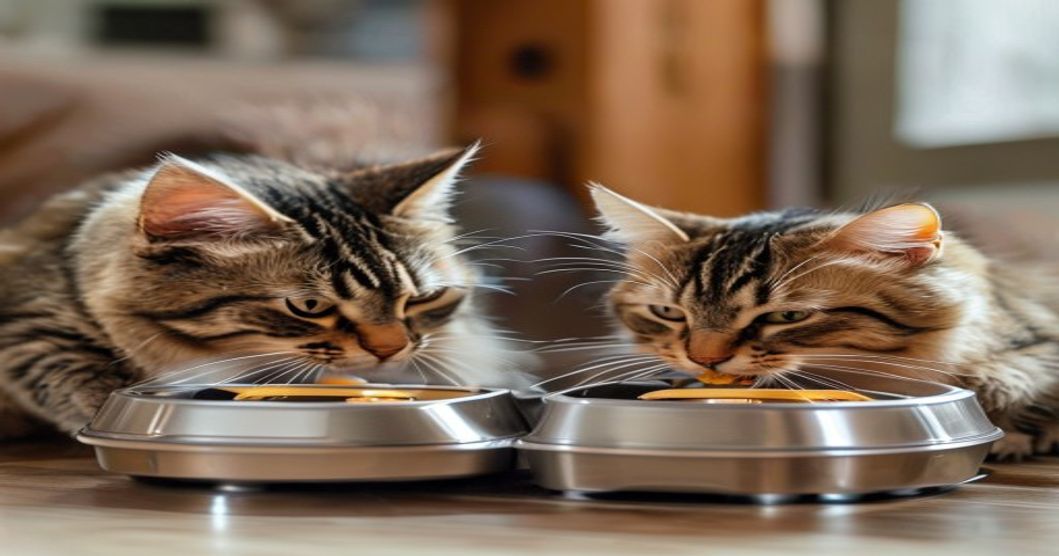
Two side-by-side compartments let you feed two cats at once with different portion sizes and schedules, reducing the chance of food-stealing. App tracks which cat ate and how much. Great for two-cat homes where portioning matters (diet-conscious cats, different weight management needs).
Good Start
Lower-cost option if you’re testing app-control feeding for the first time. App functionality is simpler (schedule setting, no photo features), and plastic bowl is easier to replace if cracked. Good for single cats or as a backup feeder in a multi-cat setup.
Comparison: What Actually Matters for Multi-Cat Homes
| Feature | Why It Matters for Multiple Cats | Red Flags |
|---|---|---|
| WiFi Reliability | You need notifications when each cat eats; lost connectivity means you can’t verify feeding remotely. | Feeders that require WiFi for basic operation (no mechanical fallback). Check reviews for connectivity complaints. |
| Bowl Material (Stainless vs. Plastic) | Plastic traps bacteria and odors, especially in humid climates or multi-cat homes where sharing risks disease transmission. | Plastic-only bowls in homes with cats prone to skin irritation or allergies. Plastic also cracks easily with frequent cleaning. |
| Portion Control Granularity | One cat may need 0.5 cups, another needs 0.75 cups. Feeders that can’t dial in these differences force compromise. | Feeders with only preset portion options (e.g., small, medium, large) with no custom gram/ounce entry. |
| Compartments or Separate Units | Multi-feeder setups (one per cat) prevent dominant cats from monopolizing food. Single shared units only work if cats respect boundaries. | One-bowl shared feeders for homes with food-aggressive cats. You’ll likely end up buying two anyway. |
| Hopper Size & Clog Resistance | Larger hoppers mean less frequent refilling. Dry-kibble only models clog less; wet-food feeders need weekly cleaning. | Narrow hoppers that jam with kibble dust. If you feed mostly wet food, look for models with larger drain holes. |
| App Features (History, Photos, Pause) | Eating history helps track which cat ate when (useful if one cat skips meals or overeats). Photo/video on open adds peace of mind. | Apps that crash frequently, require reinstalling to sync, or don’t save eating history. Test the app with the seller’s demo first. |
Pros and Cons of App-Controlled Feeders for Multi-Cat Homes
- Remote control: trigger meals from work or while traveling (if WiFi is stable).
- Portion tracking: app logs how much each cat ate, helping catch weight or appetite changes early.
- Flexible scheduling: different feeds at different times for cats with varied needs.
- Reduces overfeeding: portions are measured automatically, not guessed by hand.
- Notifications alert you when the feeder opens or runs low on food.
- WiFi dependency: app crashes or connectivity issues freeze your feeder’s remote access.
- Clogging risk: kibble dust and humidity can jam hoppers, especially in plastic models.
- Higher cost: $50–$150+ per feeder, versus $10–$30 for manual feeders.
- App overcomplication: some owners find the app cluttered, with features they don’t use.
- Food-stealing still happens: one cat can eat both portions before the next scheduled time.
- Maintenance: weekly cleaning is essential to prevent mold and bacteria buildup.

Real Owner Complaints and How to Avoid Them
App-controlled feeders fail in predictable ways. The most common complaint isn’t the feeder itself—it’s the app losing sync with the device. You schedule a meal for 8 AM, but the feeder doesn’t receive the command, and your cat goes hungry. Check recent reviews specifically for users in your region (some report WiFi issues tied to older router bands) and read through mentions of app crashes.
Hopper clogs are the second-biggest issue, especially in humid climates. Kibble dust collects inside, and the motor gets stuck. This is why stainless steel models are worth the extra cost—easier to wipe down, and fewer static cling issues. Store your dry food in an airtight container before pouring into the hopper, not straight from the bag.
The third gotcha: one cat eats both portions. If you have a food-aggressive cat, a single-bowl feeder won’t solve the problem, no matter how smart the app. You genuinely need separate feeders in separate rooms or a microchip-activated feeder (which costs more and has its own failure points—the chip reader sometimes doesn’t recognize the collar tag). Most multi-cat owners end up buying two or three feeders, not one.
Battery backup is also underrated. If your feeder needs batteries for the motor and you don’t check them monthly, it will fail silently while the app tells you everything is fine. Set a calendar reminder to replace batteries every six months.
Who This Feeder is For (and Who It Isn’t)
Best for: Busy owners with unpredictable schedules (variable work hours, frequent travel). Households where cats have different dietary needs (one on a diet, one free-feed). Multi-cat homes where you need to monitor intake to prevent obesity or catch health issues early. Owners who want portion control without daily guessing. Anyone with two or more cats and the budget to buy separate feeders for each.
Not a good fit for: Single-cat households (a basic timer feeder is cheaper and just as reliable). Owners with unstable WiFi or frequent power outages. Homes with very young kittens (they may not respect the feeder’s rules and can get stuck). Owners unwilling to clean the feeder weekly. Budget-first households—these feeders aren’t cheap. People who prefer maximum control and minimal gadgets; you’ll resent the app dependency.
Setting Up Your App Feeder for Success
Once you’ve picked a feeder, placement matters. Position it in a low-traffic area away from direct sunlight (heat can warm the food and attract bacteria). If you have multiple feeders, keep them visible from one spot so you can monitor which cat is eating. Use a mat underneath to catch spills and make cleaning easier.
Before fully relying on the app, test it. Set up a feeding schedule and watch the feeder manually to confirm it opens on time. Check that notifications arrive on your phone (sometimes they’re delayed or turned off by default). If you’re feeding two cats, test that each compartment dispenses the right portion.
Related guides that dive deeper: our guide to stainless steel automatic cat feeders for wet food covers models that handle softer diets (helpful if your cat has a sensitive stomach), and our article on feeders with portion control for diabetic cats explains gram-level precision if weight management is critical to your cat’s health.
Maintenance and Long-Term Reliability
Clean the bowl and any removable parts every week. Use warm soapy water and dry thoroughly before refilling. Check the hopper for kibble dust or debris weekly; if you see buildup, a small brush or pipe cleaner can clear the chute. Replace batteries every six months (don’t wait for the feeder to fail).
Store the feeder away from heat sources and direct sunlight. If you take it on a trip, clean it before packing, and check that the app syncs on your new WiFi network before relying on it in a new home.
Most app-controlled feeders last 3–5 years if maintained well. After that, app support may be dropped by the manufacturer, leaving you without remote access (though mechanical feeding usually continues). Plan for replacement or keep a backup manual feeder on hand.
An app-controlled automatic feeder works best in multi-cat households where cats eat on different schedules and you need to track portions. Skip the single-bowl models if you have food-aggressive cats—buy separate feeders instead. Stainless steel is worth the cost for durability, and always test WiFi sync before you leave town.
Explore Options on Amazon →
Disclosure: This article contains affiliate links. As an Amazon Associate I earn from qualifying purchases. We may earn a commission if you click through and make a purchase, at no additional cost to you. This helps support our pet product research and guides.